Everything, one hover away
Hover over the notch, click it, or press ⌃ ⌥ Space. Move away and it tucks itself back in.
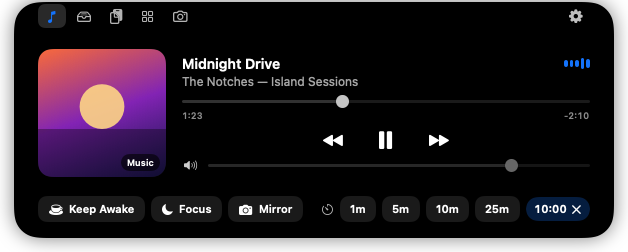
Now Playing
Artwork, scrubbing, play/pause/skip and volume for Music, Spotify and video in your browser.
File Shelf
Drag files onto the notch to park them. Drag them out to any app or folder, or AirDrop them.
Clipboard history
Your recent copies, text and images. Passwords from password managers are skipped automatically.
Quick tools
Keep Awake, Focus, Mirror and one-tap timers sit right under the player. CPU, memory and Wi-Fi are one tab over.
Mirror
A quick camera check before a call. It turns off the moment the notch closes.
Themes
Liquid Glass Light and Dark for Apple's glass look (slide from clear to frosted), five solid looks with optional glow, or make your own with a tiny JSON file.
Live activities beside the notch
Even when it's closed, the notch shows what's happening: music playing, a timer counting down, your volume, or a quick charging animation when you plug in or unplug.
 Music playing
 Timer
Timer Volume
 Plugged in
 Unplugged
No notch? On external displays and older Macs, SmartNotch shows a floating pill instead. It also shows "In a call" when Zoom, FaceTime, Phone, Teams or WhatsApp is using your mic or camera.
Install in a minute
SmartNotch is a free student project, so it isn't registered with Apple's paid developer program. Pick whichever way suits you. Either way you only set it up once: updates install themselves from inside the app.
Option 1: one commandNo security prompt
Open Terminal (press ⌘ Space, type Terminal, press Return), paste this line and press Return:
curl -fsSL https://riteshmoole.github.io/SmartNotch/install.sh | bash
It downloads the latest version, checks it's signed by SmartNotch's own certificate, puts it in Applications and opens it. Because the download didn't come from a browser, macOS doesn't ask you to approve it. Read the script first if you like. It's short.
Option 2: download the app
- Download SmartNotch.zip. Safari unzips it for you. In other browsers, double-click the ZIP in Downloads.
- Drag SmartNotch from Downloads into Applications.
- Open SmartNotch from Applications. macOS says it can't verify the app. Click Done. Don't move it to the Trash.
- Open Privacy & Security, scroll down to Security, and click Open Anyway next to "SmartNotch was blocked". Confirm with Touch ID or your password.
Open Privacy & Security
That's it. After that it opens like any other app. Look for the icon in your menu bar. The full source code is on GitHub if you'd like to check it first.
Updates find you
When a new version is out, a red dot appears on the gear in the open notch, and the menu bar icon gets an Update Available item. Click either, then Install Update. SmartNotch downloads the new version, replaces itself and reopens. No dragging, no security prompt, and your settings and permissions carry over.
 A new version is ready
Install Update arrived in version 0.1.6. On 0.1.5 or older, update by hand one last time: run the command above, or download the ZIP, quit SmartNotch, drag the new one into Applications and choose Replace.
Private by design
No accounts, no analytics, no tracking. Nothing about you leaves your Mac. The only network requests are a daily check for new versions (you can turn it off) and the download when you click Install Update. SmartNotch only asks for a permission when you use the feature that needs it.
| Feature | Permission | When it's asked |
|---|---|---|
| Everything else | None | Never |
| Mirror | Camera | First time you open the Mirror tab |
| Volume HUD (on by default) | Accessibility | Right after the welcome screen (say no to keep the macOS overlay) |
| Music/Spotify fallback | Automation | Only if full media detection stops working after a macOS update |
Questions
Does it work on my Mac?
Any Mac with Apple Silicon (M1 or newer) running macOS 14 Sonoma or later. Best on MacBooks with a notch. Other screens get a floating pill.
macOS says "SmartNotch.dmg" Not Opened. What now?
That's the old download format. macOS blocks it before it even opens. Download the ZIP instead and follow the steps above. If you'd rather keep the DMG: click Done, then go to System Settings → Privacy & Security and click Open Anyway, once for the DMG and once more for the app.
Why does macOS warn me when I open it?
Apple's warning appears for any app downloaded in a browser that isn't notarized through its $99/year developer program. SmartNotch is free and open source, so you confirm it once in Privacy & Security, or use the one-line install, which skips the warning. Updates installed from inside the app never show it.
Will Now Playing always work?
It uses a workaround to read what's playing, and a future macOS update could break it. If that happens, SmartNotch falls back to Music and Spotify and tells you, instead of showing an empty panel.
Can it show my notifications or who's calling?
No. Apple doesn't let apps read other apps' notifications. The "In a call" indicator only knows that your mic or camera is busy, so it appears once you answer, not while the call is ringing.
How do I uninstall it?
Quit it from the menu bar icon and drag SmartNotch from Applications to the Trash. Optionally delete ~/Library/Application Support/SmartNotch.
How do I get updates?
SmartNotch checks for a new version when it starts and once a day. When one is out, a red dot appears on the gear in the open notch and an Update Available item appears in the menu bar. Click either, then Install Update: SmartNotch replaces itself and reopens. If that can't work (for example, on an account that isn't allowed to change apps), it tells you why and the Download button still works. Running the install command again also updates it.